> MadBlog > Article

Guest Post: Version Filters in HTML5 Output

Published on: January 28, 2013

MadCap Software Logo

Tom Tregner, Enterprise Training Engineer at Blackbaud and author of the Flare For Programmers blog, recently posted an article about applying conditions to your Flare content and using them to create a version filter in your HTML5 output. With Tom’s permission, we’ve re-published it here for you to check out:

Version Filters in HTML5 Output

Keep the condition tags but skip the target settings.
tregner_blog

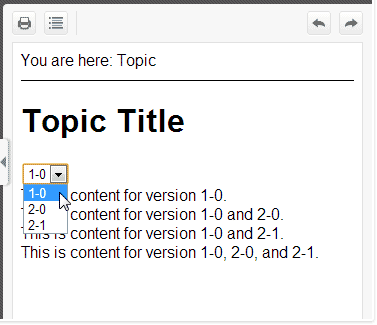
![](file:///C:/Users/TomTr/AppData/Local/Temp/msohtmlclip1/01/clip_image002.jpg "filter-in-flare-html5-topic")You can apply conditions to your Flare content and use those conditions to create a version filter in your Flare HTML5 output. The main ingredients are a select element and a little JavaScript.

Click here for the rest of Tom's post along with a sample Flare Project.

Posted in: MadCap Flare, Tips & Tricks


Jennifer White

Jennifer White, a Product Evangelist at MadCap Software, has over 15 years of experience in writing, broadcasting, public speaking, marketing and social media management. Jennifer has also served as a social media manager, blogger, on-air host, writer and content provider for CBS Radio and Fox TV.

Try for Free

See it in your own workflow. Start a free trial and build your first project today.

lightbulb icon

Have a suggestion for a blog article? Submit it here