Mattias Sander, Senior Technical Writer at SimCorp, brings us our latest Guest Post. An engineer by training and a technical writer by trade, Mattias creates user documentation for one of the world’s most advanced investment management systems. We came across this post on his blog, The TechWriting Engineer, and re-published it here for you to check out:
Generating MadCap Flare Snippet Files Using Excel
If you have a list of phrases (e.g. a list of STE terms) you would like to quickly add to Flare as snippet files to make good use of Flare’s clever “auto suggest based on snippet” feature, keep reading.
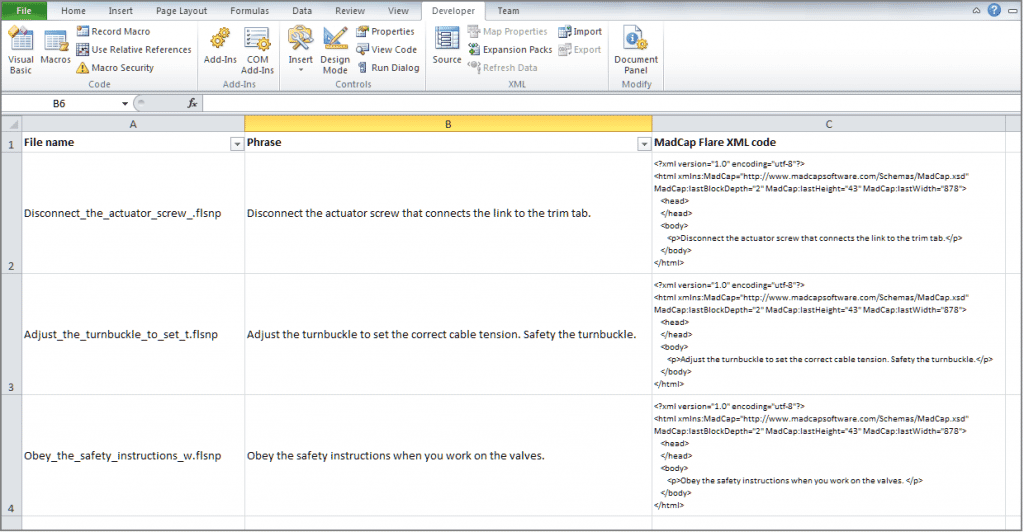
The idea is to copy or write the phrases into a spread sheet, add a column for the file name, and another column for the MadCap Flare snippet XML code, then write a short VBA script that creates a new snippet file for each phrase in the spread sheet, and saves the files on your desktop. Take a look at the screen capture:
To read the rest of the post, visit The TechWriting Engineer.