> MadBlog > Article

Quick Tip: Continuing the Sequence of an Interrupted Ordered List

Published on: December 4, 2013

1111
2013 11 18_1304

While perusing Twitter for some cool stuff to share with my followers, I came across this tweet:

Why yes, Zack, yes there is!

First, make the items after the text that "interrupts" your list into their own separate list, like this:
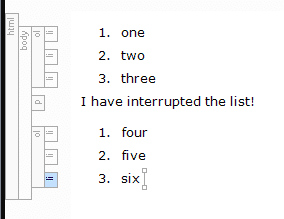
list2

Next, place your cursor into one of the list items, like this:
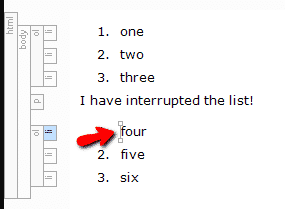
list3

Now, right click on the ol (ordered list) structure bar and select "Continue Sequence" from the drop-down menu.

list4

Et voilà! Your list has continued, just the way you wanted it to.
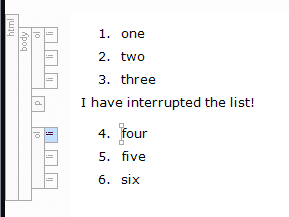
list5

Posted in: MadCap Flare, Tips & Tricks


Jennifer White

Jennifer White, a Product Evangelist at MadCap Software, has over 15 years of experience in writing, broadcasting, public speaking, marketing and social media management. Jennifer has also served as a social media manager, blogger, on-air host, writer and content provider for CBS Radio and Fox TV.

Try for Free

See it in your own workflow. Start a free trial and build your first project today.

lightbulb icon

Have a suggestion for a blog article? Submit it here