What is DITA?
DITA (Darwin Information Typing Architecture) is an open XML standard for writing content once as small, reusable topics and publishing it anywhere, from PDFs to AI tools.
How can DITA help me?
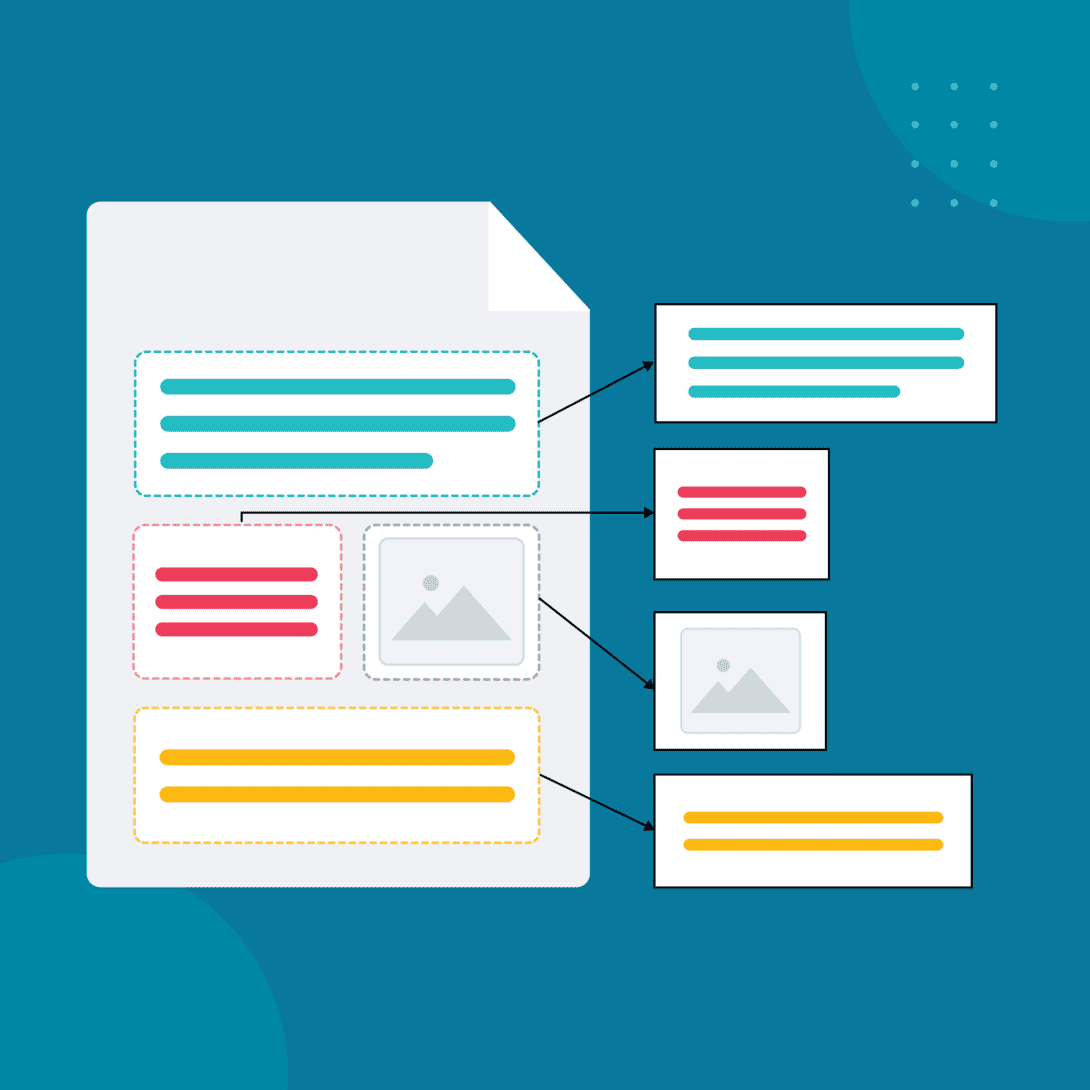
Defined and maintained by the OASIS DITA Technical Committee, DITA XML helps companies streamline technical writing and documentation processes. You write a piece of content once, then publish it to manuals, help sites, PDFs, and AI tools without copying and pasting.
It gives you three building blocks:
- Topics: short, focused units of content that each answer one question or cover one task
- Maps: outlines that pull topics together into a manual, help system, or course
- Outputs: the formats you publish to, from PDF to web to mobile
If your team maintains PDFs that run hundreds of pages, fixes the same paragraph in a dozen files, or wonders whether your content is ready for AI, DITA is worth a closer look. Here is what it is, how it works, and where a CCMS fits in.
Why go with a structured content standard?
Unstructured content looks fine until you need to update it, translate it, or publish it somewhere new. A standard like DITA gives you:
- Consistency: every topic follows the same rules, no matter who wrote it
- Reuse: write once, use it in every document that needs it
- Multichannel publishing: one source, many formats
- AI readiness: clean, tagged content that new tools and AI systems can read
DITA tags describe what content is (a step, a warning, a product name), not how it looks. That means you can restyle every output without touching the source.
Topics and Maps
DITA organizes content by purpose. Common topic types include task, concept, reference, glossary, and learning topics, so writers always know where each type belongs. Maps and bookmaps then assemble those topics into finished deliverables, in whatever order each audience needs.
- Task – step-by-step procedures
- Concept – background or overview info
- Reference – structured, factual data
- Glossary – definitions of terms
- Learning – content for training (e.g., Learning Objectives, Assessments)
You then assemble these topics using maps and bookmaps — files that define the hierarchy and structure for deliverables. This allows you to build everything from product manuals to training courses without rewriting the same information.
Reuse at the topic level
Each topic is its own XML file. Update it once, and the change flows to every PDF, PowerPoint, RTF, and mobile output that uses it. Managing thousands of these files by hand is where teams get stuck, and it is why most DITA teams use a DITA content management system. It lets you standardize and reuse different types of content effectively, publish to multiple platforms, and translate large batches of content with ease.
The Benefits of DITA

Ready for AI
Small, tagged topics give AI tools clean, accurate content to work from, with less risk of outdated answers.

Content consistency and predictability
Every writer follows the same structure, so readers get a predictable experience across every guide.

Clear documentation hierarchy
Maps show exactly how topics fit together, making large doc sets easier to navigate and maintain.

Write once, reuse everywhere
Shared topics stay in sync across products, versions, and audiences.

One source of truth
Every channel pulls from the same approved content, so nothing drifts out of date.

Lower Translation Costs
Translate a topic once and reuse it, instead of paying to translate the same text again.

Publish to any format
Generate PDF, web, mobile, and more from one source and publish across all channels.

Works across systems
An open XML standard moves cleanly between tools and platforms.

Rebrand without rewriting
Styling lives outside the content, so a brand refresh is a template change, not a content project.
What a DITA CCMS Adds

Link management
Cross references and links update automatically, so nothing breaks when content moves.

Security and access
Organize your users in specific security groups to give them the appropriate permissions and rights.

Easy content findability
Improve content findability with advanced search capabilities and intuitive navigation tools.

Taxonomy management
Apply and maintain consistent terms so content stays organized and searchable.
DITA in Action
Picture a smartphone launch. Every model needs a user manual, translated into every market language, and published in print, online, as a PDF, and behind a QR code on the box. Now multiply that by every model in the lineup, each with its own small differences.
With DITA, you write shared content like setup steps and safety notices once as topics. Conditional filtering handles model differences, each topic is translated once, and every format is generated from the same source.
Manage Multiple Product Releases at Once
IXIA CCMS lets you manage and automate parallel and multiple deliveries, or even continuous deliveries, while maximizing reuse. All content is stored in a central repository and can be repurposed for publishing across multiple publications, products, and languages. This provides a single, trusted source of content (referential). The CCMS features an easy-to-use interface that anyone can adopt—even non-DITA users.
You can also filter and create targeted content based on product options. This creates slimmer but more targeted deliverables. End users won’t need to skim through irrelevant or unnecessary content.
Simplified Content Retrieval
Within a DITA content management system, you can search for a word, group of words, or phrase in a certain version of a document. You get results containing the search term. Unlike other systems where you must manually locate the file and link to its path, this happens at the press of a button, making content reuse easy.
Inside a component content management system, document versions are traced and recorded. You can track components individually or as an entire documentation set. This ensures full transparency in the edit and review process.
Where DITA Meets CCMS
DITA becomes even more powerful when paired with a Component Content Management System (CCMS). A CCMS like MadCap IXIA manages these individual topics and maps, tracks versions, permissions, localization, and automates publishing to different formats.
With a DITA CCMS, teams can:
- Reuse the same content across products, languages, and formats
- Track component history and review changes
- Reduce translation costs by avoiding redundant content
- Empower SMEs and reviewers to collaborate more easily
Managing DITA at scale
DITA works best when you manage your topics, maps, and translations in one place. That is the job of a component content management system. Learn what a CCMS is and how it works.
IXIA CCMS is built for DITA teams, with version control, collaboration, and automated publishing in one system. See how semiconductor firms benefit from a CCMS and which leading companies are using IXIA CCMS.