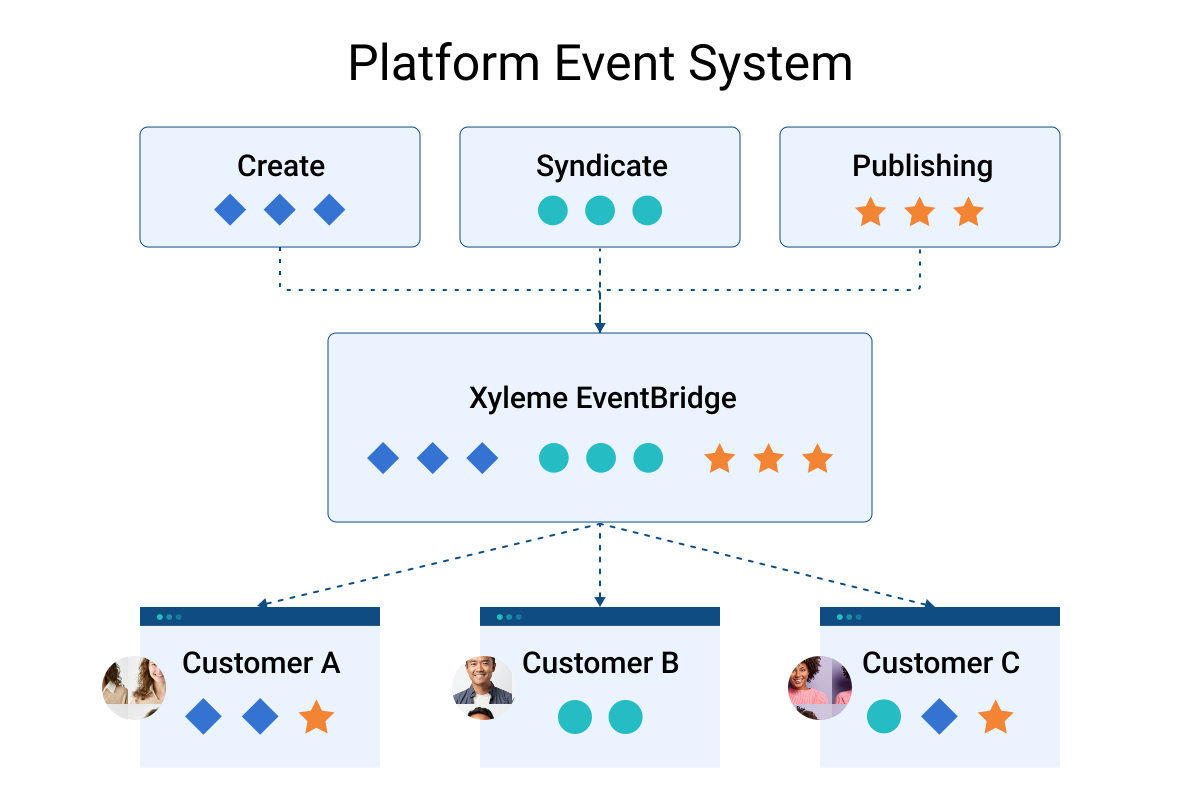
As individuals interact with the MadCap Software Platform, whether creating, reviewing, or publishing content or managing the content for distribution, their actions are stored as events. Imagine that these events could be shared with other systems, serving as notifications that can trigger integrations or automations! Events allow different systems to communicate and function cohesively, informing what happened, to whom, where, and when.
As content ecosystems evolve, MadCap Software’s Platform Event System is an important tool for enhancing workflow efficiency. Acting as a communication hub, notifying integrations whenever specific actions occur, thereby enabling other systems to respond and adapt in real-time.
MadCap Syndicate, one part of the MadCap Software platform is responsible for facilitating content delivery across multiple endpoints, such as a Learning Management System (LMS), websites, help portals, and experience platforms. By combining workflow automation tools, MadCap Software Platform events, and Syndicate’s robust set of APIs, you can power nearly endless integration capability.
But what exactly does “semantic analysis” mean, and how did we decide that semantic search was a valuable-enough AI technology to implement for our enterprise customers?
Why Semantic Search Matters
When we set out to develop AI Search, we knew that we wanted to do more than just improve the user experience of the MadCap Software search functionality or only marginally increase the quality search results for end uses. We wanted to do everything we could to ensure that users are able to find the content that is most relevant to their query, even if their queries don’t have exact keyword matches with the most relevant content. To do this, we needed to provide a centralized database of the semantic value of each piece of content in our customers’ content inventories – not only for use by the AI Search feature itself, but also the foundation for powering other AI technologies and solutions yet to be implemented by either MadCap Software or our customers. This semantic value of each piece of content is called an “embedding”.
What are Semantic Embeddings?
At its core, semantic search is all about understanding the meaning behind words, both in the content and in the user’s search query. In traditional keyword-based searches, algorithms look at individual terms to determine relevance. But what if we could capture the essence of each piece of content – its underlying themes, concepts, and relationships?
That’s where semantic embeddings come in. Embeddings are mathematical representations of a piece of content that distill its essential characteristics into a compact vector. Think of them as having a numerical summary or representation of the meaning behind a piece of content. The language of the content is also not as important, since the content will mean the same thing regardless of the language in which it’s written. This allows us to compare and contrast different pieces of content based on their shared meanings. As you might be able to imagine, once we have a numerical representation of a piece of content, those numbers are much easier for a computer to analyze and compare as opposed to large blobs of text, meaning that we are able to get higher-quality search results overall.
We can engage in a thought experiment and think of these embeddings as the content’s coordinates on a map (albeit, a complicated, multi-dimensional map). When each piece of content is given coordinates on a map, it means that you can look at the map at a bird’s-eye view and really get an understanding of what your content inventory looks like: what subjects of content you have and do not have, what content you need, what a piece of content’s neighborhood looks like, etc.
Customer Story 1: Streamlining Content Management with SharePoint
A customer faced challenges with managing content across various tools, including MadCap Create and Syndicate, and also storing files in SharePoint. The absence of a single source of truth made content management cumbersome. By implementing Syndicate and leveraging MadCap Software's Platform Event System, we moved all content files to a centralized location, tagged and organized them, and then built an automated integration with SharePoint. This integration ensured that while SharePoint remained the web portal for staff members, the content was managed efficiently in Syndicate, providing a single source of truth and dramatically improving content control.
Customer Story 2: Centralized User Management
In Case 2, the customer has multiple business units sharing the same MadCap Syndicate environment, so they’ve set up a complex permission model. The main challenge is efficiently managing user groups and the folders they control. Handling this manually for thousands of users and groups across hundreds of folders isn’t practical. The organization centrally manages all users and controls access to various applications within their ecosystem.
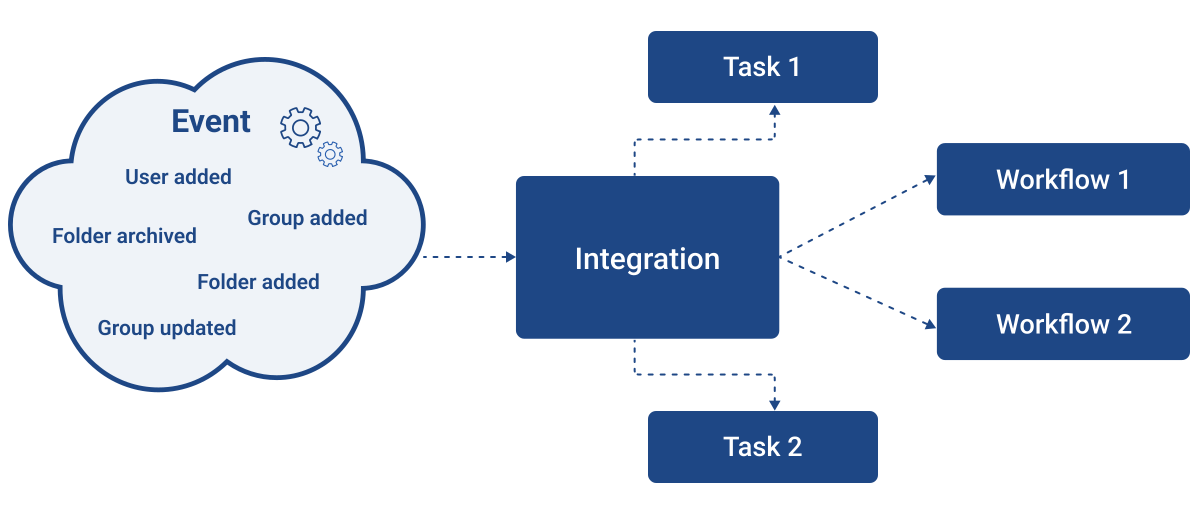
As employees join, move, or leave the company, these changes need to be updated in Syndicate. To automate this, MadCap Software sends real-time events (user created, permission updated, folder moved, etc.) to the customer’s integration. These events trigger other tasks or workflows. The final solution automates user management, group membership, and folder permissions. The customer uses their tools along with MadCap Software’s APIs to manage this complex work.
Power Your Integrations With Events
MadCap Software’s Platform Event System, built on Amazon Web Services’ EventBridge, allows customers to access and use the events that matter to them. This empowers organizations to leverage their data efficiently and enhance their workflows. Events greatly simplify integrations that are usually done with pulling or polling, reducing costs and lowering the barrier to entry.
Not sure you have the technical capacity to develop and host integrations? MadCap Software offers Integration as a service (iPaaS). Let us design , build and host your integration.